显卡检测神器 GPU-Z v2.71.0
是最知名的显卡信息显示工具,硬件网站TechPowerUp.com提供给我们的一款GPU识别软件,界面直观,运行后即可显示GPU核心,以及运行频率、带宽等,如同CPU-Z一样,这也是款必备工具。买电脑的时候带上他能帮助你更好的掌握和了解当前PC中的显卡配置情况。
温馨提示:本文发布于 2026-09-24,内容可能随时间推移而失效;若遇到链接打不开、资源异常等情况,可在下方「反馈」中告诉我们,我们会尽快核实处理。
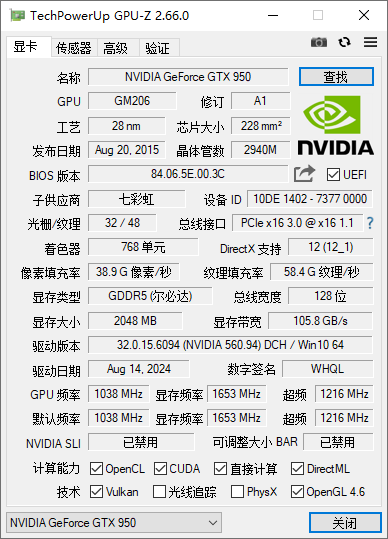
GPU-Z 是最知名的显卡信息显示工具,硬件网站TechPowerUp.com提供给我们的一款GPU识别软件,界面直观,运行后即可显示GPU核心,以及运行频率、带宽等,如同CPU-Z一样,这也是款必备工具。买电脑的时候带上他能帮助你更好的掌握和了解当前PC中的显卡配置情况。
更新日志
vv2.71.0 (September 22nd, 2026)
Added GeForce 50 Hot Spot thermal sensor and the hottest memory chip is also reported (tooltip shows all memory chip temperatures)
Added an “overclocking” readout on the advanced tab for NVIDIA, reporting OC frequencies, including XBAR, SYS, video clock and boost lock status
Added support for reading NVIDIA SYS, L2 and Video clocks. These can be enabled in sensor settings, they are disabled by default
Added a sensor that reports PCI-Express bandwidth throughput numbers in GB/s for NVIDIA GPUs
When a sensor is not logged to file, its dropdown arrow on the sensors tab will be grayed out
Fixed NVIDIA GP102 transistor count
在下方评论区发表一条评论后,等待约 15 秒即可解锁全部 2 个下载地址,同一浏览器有效。